Kris+ Merchant Resource Page

- SG
- AU
Thank you for being a Kris+ partner!
Kris+ is a lifestyle app for KrisFlyer members to earn and redeem KrisPay miles at participating merchant outlets. More information can be found at https://www.krisplus.com.
Kris+ users will be visiting your outlet to:
- Pay with Kris+
- Via Apple Pay or Google Pay in Kris+ app and automatically earn KrisPay miles for it
- Via KrisPay miles
- Combination of KrisPay miles and Apple Pay or Google Pay in Kris+ app and automatically earn KrisPay miles for it
- Redeem Kris+ Privileges or Vouchers (Pre-purchased)
Please refer to our PDF guide for a step-by-step guide with screenshots here. Alternatively, you can refer to our video tutorials below.
For assistance on Kris+ related queries, please Whatsapp to +65 8940 9259 or email KrisPlus@singaporeair.com.sg.
Kris+ Cashier Video Guides
Below, we have created a series of short, easy-to-follow video tutorials on how to use Kris+ Cashier, our platform for frontline staff. These videos cover everything you need to know to manage transactions seamlessly, inclulding:
- Understanding customers' payment journey with Kris+,
- Viewing and checking transactions,
- Processing refunds quickly and efficiently, and
- Redeeming Deals and Privileges.
Kris+ Cashier Payment & Refund
In the video below, we will walk you through the essentials of processing payments and handling refunds using Kris+ Cashier.
Redemption of Deals (eVouchers)
This video explains how customers can redeem Deals and guides you through the verification process of these redemptions seamlessly.
Redemption of Privileges
This video demonstrates how customer can redeem Privileges and shares how you may verify these redemptions with ease.
Frequently Asked Questions
All VISA and Mastercard® debit/credit cards are supported. American Express issued credit cards are also supported, except bank-issued AMEX cards e.g. UOB-AMEX.

Troubleshooting Steps:
- Ensure debit/credit cards are properly set up in Apple Pay or Google Pay.
- Green tick should be reflected in customer's Account tab when enabled.
- Update customer's Kris+ mobile app to the latest version.
- Reboot both customer's and merchant's devices.

Please request for your headquarters to advise on the username/ password.
Alternatively, you can reset the password via Kris+ Cashier (https://cashier.prod-krispay.com/)
A verification code will be sent via email to the appointed Contact Person. Please Whatsapp to +65 8940 9259 or email KrisPlus@singaporeair.com.sg if you require assistance.

Under “Payments” tab, the latest transaction will be shown at the top of the list.
Verify the date & time of the transaction and the amount collected.
The 6-alphanumeric characters are a reference to the app user’s transaction ID.
For a step-by-step visual walkthrough, watch our Kris+ Cashier Payment & Refund Guide starting at 2:29.
Under “Redemption” tab, the latest transaction will be shown at the top of the list.
Verify the date & time of the transaction.
- Deal Vouchers – Customer has already paid for the voucher. After redemption of voucher, customer will pay balance amount (if any).
- Privileges – Payment has not been made. Customer needs to pay amount after discount.
For a step-by-step visual walkthrough, watch our Kris+ Cashier Deals and Kris+ Cashier Privileges video guides.
Refund through Kris+ Cashier for transactions within the past 24 hours.
For a step-by-step visual walkthrough, watch our Kris+ Cashier Payment & Refund Guide starting at 2:52.
Refund through Kris+ Merchant Portal using “Admin” access level is available for transactions within the past 60 days.
A voucher cannot be refunded using Kris+ Cashier.
Through Kris+ Merchant Portal using “Admin” access level, you can revert the voucher status to active & refund the voucher.
To download reports, please login to Kris+ Merchant Portal.
Kris+ Cashier does not have the ability to generate reports for download.
For a clearer set up explanation, watch our Kris+ Cashier Payment & Refund Guide starting at 0:17.

For a clearer set up explanation, watch our Kris+ Cashier Payment & Refund Guide starting at 0:37.

Thank you for being a Kris+ partner!
Kris+ is a lifestyle app for KrisFlyer members to earn and redeem KrisPay miles at participating merchant outlets. More information can be found at https://www.krisplus.com.
Kris+ users will be visiting your outlet to:
- Pay with Kris+
- Via Apple Pay or Google Pay in Kris+ app and automatically earn KrisPay miles for it
- Via KrisPay miles
- Combination of KrisPay miles and Apple Pay or Google Pay in Kris+ app and automatically earn KrisPay miles for it
- Redeem Kris+ Privileges or Vouchers (Pre-purchased)
Please refer to our PDF guide for a step-by-step guide with screenshots here. Alternatively, you can refer to our video tutorials below.
For assistance on Kris+ related queries, please email KrisPlusAU@singaporeair.com.sg.
Kris+ Cashier Video Guides
Below, we have created a series of short, easy-to-follow video tutorials on how to use Kris+ Cashier, our platform for frontline staff. These videos cover everything you need to know to manage transactions seamlessly, inclulding:
- Understanding customers' payment journey with Kris+,
- Viewing and checking transactions,
- Processing refunds quickly and efficiently, and
- Redeeming Deals and Privileges.
Kris+ Cashier Payment & Refund
In the video below, we will walk you through the essentials of processing payments and handling refunds using Kris+ Cashier.
Redemption of Deals (eVouchers)
This video explains how customers can redeem Deals and guides you through the verification process of these redemptions seamlessly.
Redemption of Privileges
This video demonstrates how customer can redeem Privileges and shares how you may verify these redemptions with ease.
Frequently Asked Questions
All VISA and Mastercard® debit/credit cards are supported by Kris+ mobile app in Australia.

Troubleshooting Steps:
- Ensure debit/credit cards are properly set up in Apple Pay or Google Pay.
- Green tick should be reflected in customer's Account tab when enabled.
- Update customer's Kris+ mobile app to the latest version.
- Reboot both customer's and merchant's devices.
Please request for your headquarters to advise on the username/ password.
Alternatively, you can reset the password via Kris+ Cashier (https://cashier.prod-krispay.com/)
A verification code will be sent via email to the appointed Contact Person. Please email KrisPlusAU@singaporeair.com.sg if you require assistance.
Under “Payments” tab, the latest transaction will be shown at the top of the list.
Verify the date & time of the transaction and the amount collected.
The 6-alphanumeric characters are a reference to the app user’s transaction ID.
For a step-by-step visual walkthrough, watch our Kris+ Cashier Payment & Refund Guide starting at 2:29.
Under “Redemption” tab, the latest transaction will be shown at the top of the list.
Verify the date & time of the transaction.
- Deal Vouchers – Customer has already paid for the voucher. After redemption of voucher, customer will pay balance amount (if any).
- Privileges – Payment has not been made. Customer needs to pay amount after discount.
For a step-by-step visual walkthrough, watch our Kris+ Cashier Deals and Kris+ Cashier Privileges video guides.
Refund through Kris+ Cashier for transactions within the past 24 hours.
For a step-by-step visual walkthrough, watch our Kris+ Cashier Payment & Refund Guide starting at 2:51.
Refund through Kris+ Merchant Portal using “Admin” access level is available for transactions within the past 60 days.
A voucher cannot be refunded using Kris+ Cashier.
Through Kris+ Merchant Portal using “Admin” access level, you can revert the voucher status to active & refund the voucher.
To download reports, please login to Kris+ Merchant Portal.
Kris+ Cashier does not have the ability to generate reports for download.
For a clearer set up explanation, watch our Kris+ Cashier Payment & Refund Guide starting at 0:17.
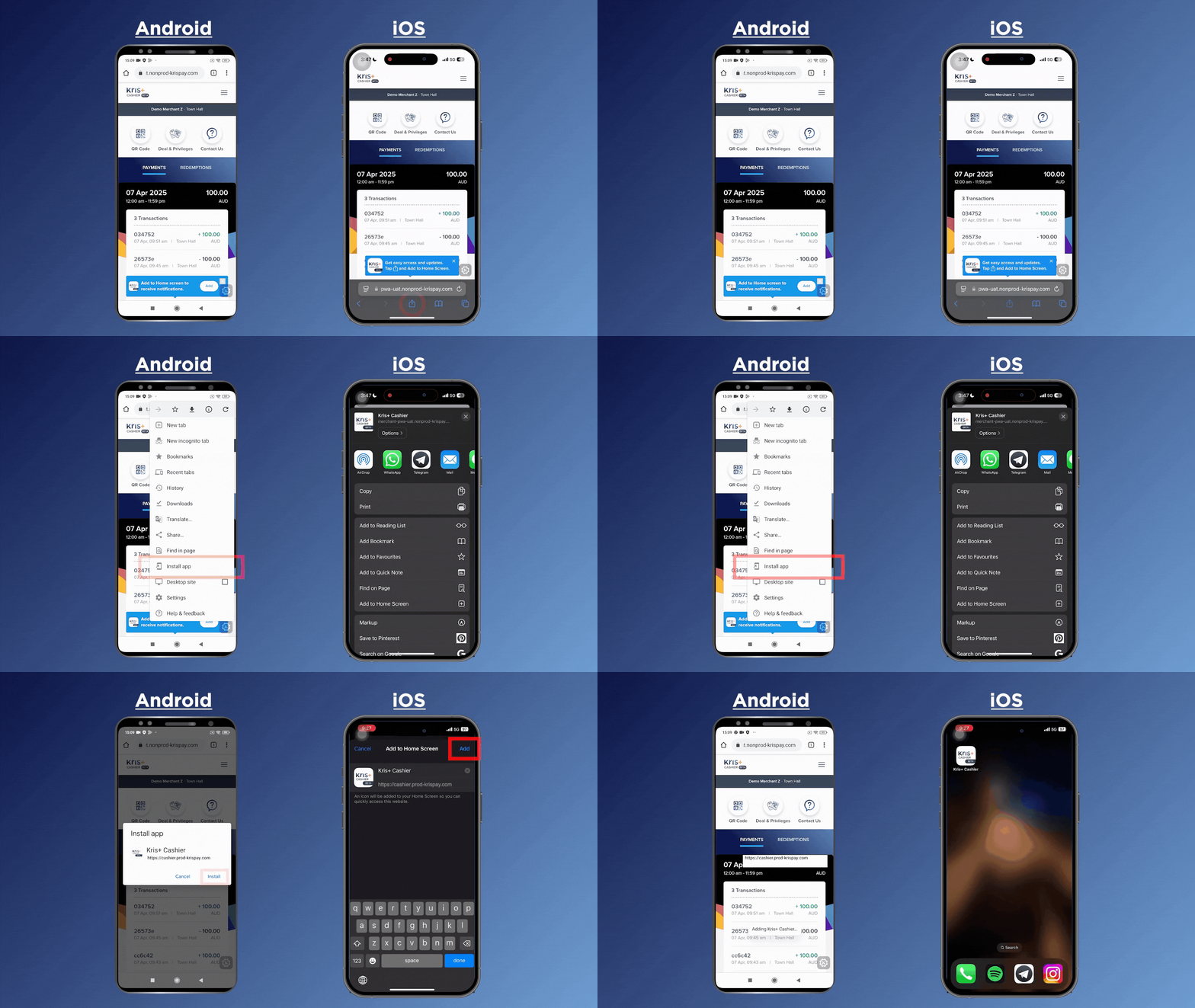
For a clearer set up explanation, watch our Kris+ Cashier Payment & Refund Guide starting at 0:37.

Term of Use
You may refer to our terms of use here.