Explore our latest inflight digital products
Enjoy KrisWorld from the comfort of your personal electronic devices on your flight today.
Learn more about digital content portal
Learn more about linking your device
Learn more about accessing KrisWorld on your personal device

Digital content portal
Expand your inflight entertainment experience with our brand new digital content portal! Access the inflight WiFi portal, web-based gaming portal, digital menu and more easily from a single webpage.
To access, simply follow these steps:
| 1. Connect to 'KrisWorld' network |
| Enable WiFi on your personal electronic device and connect to the inflight 'KrisWorld' network*. |
| 2. Enter URL |
| Enter https://krisworld.singaporeair.com |
| 3. You're connected! |
| You can now start browsing the portal! |
*If a portal pop-up appears, close the pop-up by selecting 'Cancel' and 'Use without Internet' for iOS users; or select the menu icon and 'Keep Connection' for Android users.
Tip: Bookmark the URL on your personal electronic device for easier access when onboard!
Note:
- Access to the digital content portal is not available on Boeing 737-800 NG.
- The inflight WiFi connectivity experience is subject to factors such as the number of concurrent users, satellite coverage and weather conditions. Access to the digital content portal and its contents is complimentary and will not deplete your inflight WiFi data plan.
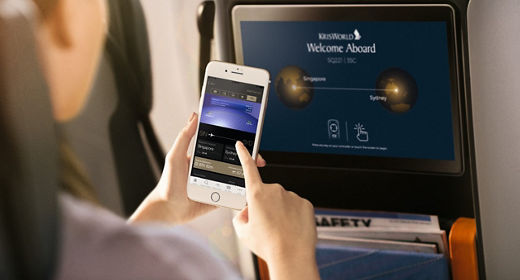
Link your device
The SingaporeAir mobile app brings you a whole new way to enjoy KrisWorld. Discover what is playing on KrisWorld even before you step onboard, create your personal playlist with your favourite movies, TV or music, and control the media playback right from your personal electronic device.
Here's what you can expect by linking your device to your seat*:
- Stay updated on your flight information from your device
- Browse our content offerings from your device and start planning your playlist
- Save your favourite content to a personal playlist on your device for easy reference and playback
- Launch and control KrisWorld content remotely on your inflight entertainment screen
- Continue your movie or TV program from where you left off just by launching the bookmark icon from your personal device
Follow these steps to start linking your device to your seat:
| 1. Download the SingaporeAir Mobile app | 2. Go to the 'KrisWorld' section in the app | 3. Enter 4-digit passcode on your device |
| Ensure you have the SingaporeAir mobile app from Google Play or App Store downloaded on your device. | Connect to the inflight WiFi network 'KrisWorld' and go to the 'KrisWorld' section in the app. Select the 'Connect to seat' icon. | When prompted on your device, enter your seat number to generate a 4-digit passcode on your seat monitor. Enter the passcode on your device to pair. |
KrisWorld on your personal device
If you are travelling on board the 737-800 NG aircraft, you can enjoy a curated selection of Hollywood blockbusters, TV hits, and music favourites. Simply bring along your personal mobile device, connect to the ‘KrisWorld’ network and visit https://www.singaporeair-krisworld.com on your web browser.
| Alternatively, scan this QR Code and bookmark the URL on your personal device for easier access. |  |
|---|